
Using Wrap · Set up clients, projects and rates
How to set a team member’s cost rate in Wrap
Add an effective-dated hourly cost rate for internal project-cost reporting.
Before you start
- Who can do this
- Owner or Admin
- You need
- The person already exists in Team.
- The hourly cost and its effective date.
Steps
- 01
Open the member
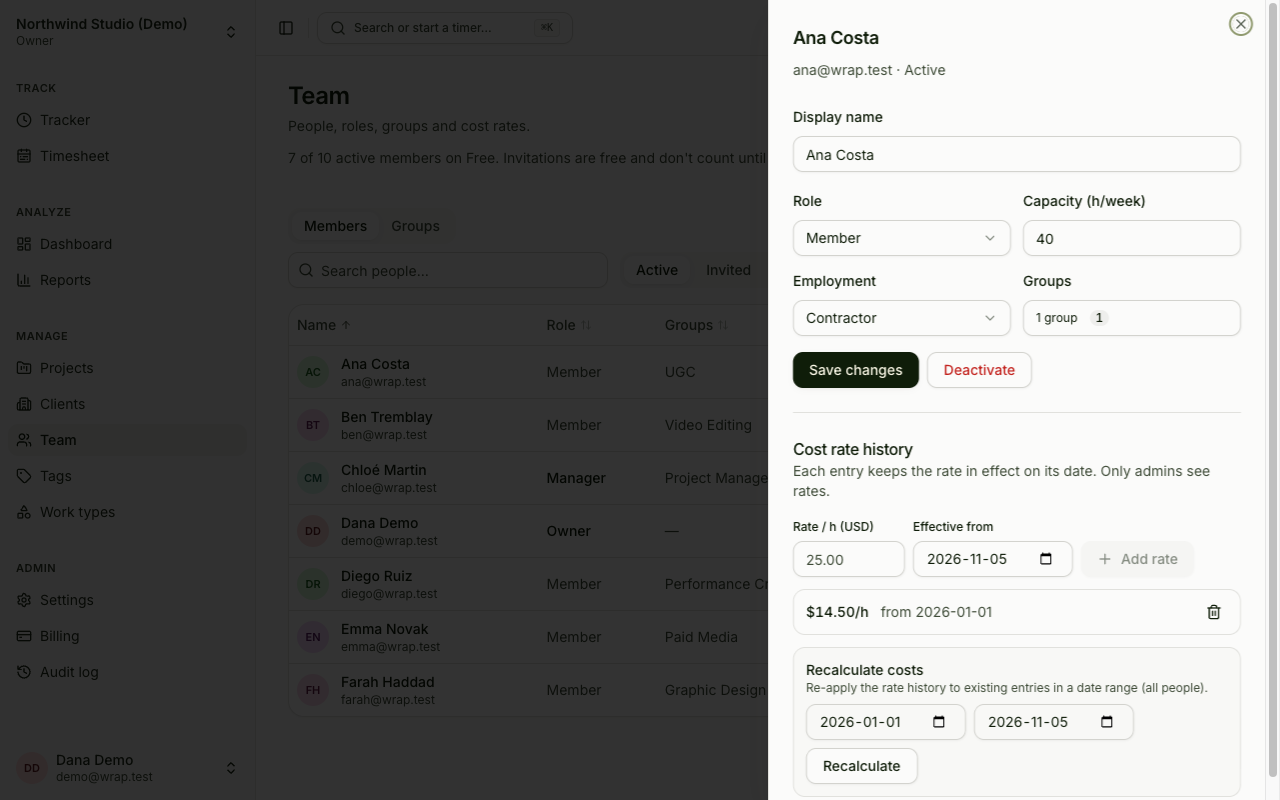
Choose Team, then click the person’s name.
- 02
Find Cost rate history
Scroll to Cost rate history in the member panel. Review any existing rates and effective dates.
- 03
Add the rate
Enter Rate / h in the organization’s currency and choose Effective from. Click Add rate.
- 04
Decide whether to update past costs
Existing entries keep their saved cost. If you deliberately need to reapply rate history, use Recalculate costs and set the date range first.
- 05
Review reporting
Open the relevant report with cost visibility and check the resulting costs for the intended period.
What you should see
The rate history includes the new effective-dated cost rate.
Good to know
- Cost rate is internal labor cost, not the client bill rate.
- Adding a rate does not change costs already stored on entries.
- Recalculate applies rate history to existing entries for all people in the selected dates, not only the person whose panel is open.
- Admin users cannot edit an Owner’s general membership settings; Owner controls remain restricted.
Keep going
Put the answers to work
on tomorrow’s timesheet.
Try Wrap with your own team. Free for up to 10 active members.