
Using Wrap · Track your time
How to wrap up your day in Wrap
Use the daily wrap to record pace, allocate the day and capture its main outcome.
Before you start
- Who can do this
- Any active member
- You need
- Know the total length of your workday and where the time went.
- Finish any running timer before completing allocation.
Steps
- 01
Open the daily wrap
Click Wrap up my day in the top bar. Use the adjacent Wrap another day control to choose a past day.
- 02
Choose how the day felt
Select Soft day, Good flow, A bit chaotic or Heavy day. Chaotic and heavy days offer reasons and a note before you continue.
- 03
Allocate the full day
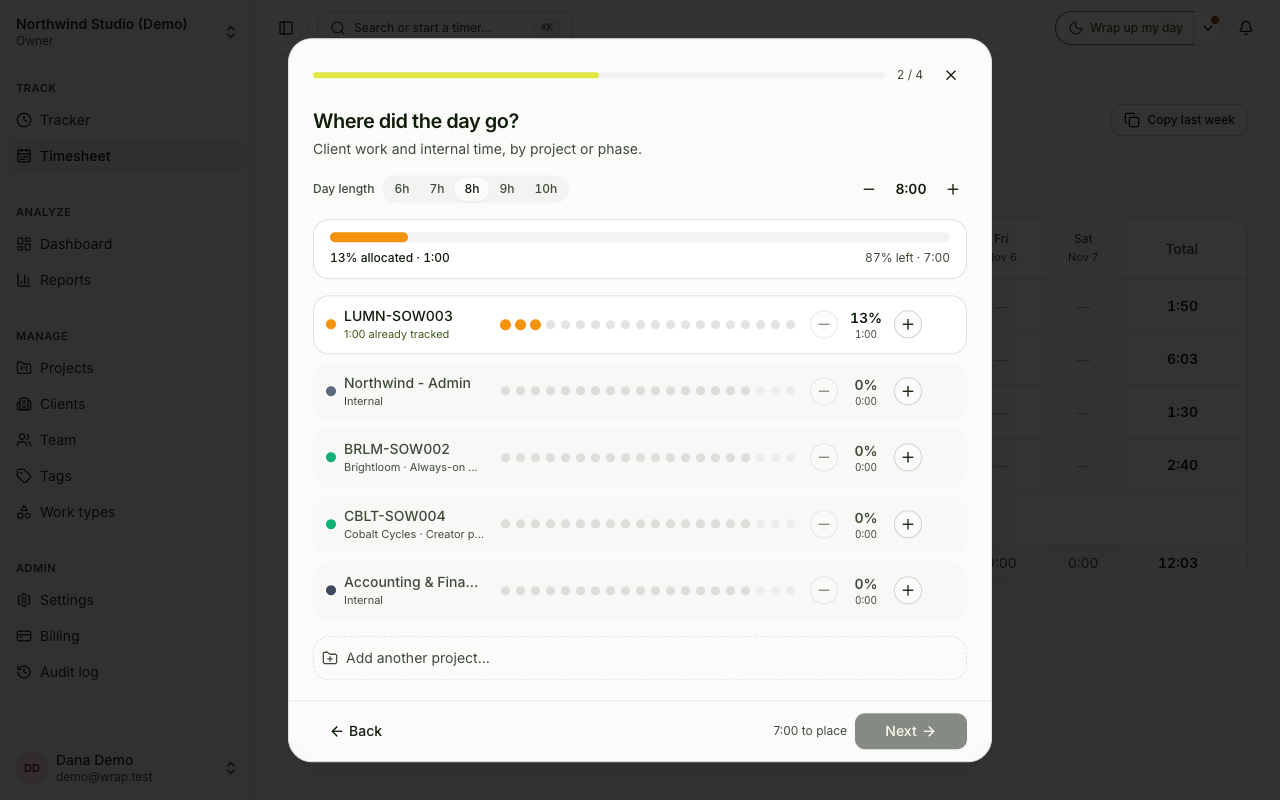
On Where did the day go?, check Day length and distribute time across projects or phases. Add another project if necessary. Reach 100% allocation before Next.
- 04
Review already tracked time
Rows show time already tracked. Include those hours in the full day allocation; they are a minimum for that row.
- 05
Add work types if useful
Allocate the work-type split for the full day, or use Skip when you leave this optional step empty.
- 06
Submit the wrap
Write The main thing and click Submit wrap. Skip this submits without that final note.
What you should see
Wrap records the day’s reflection and allocated time, then shows its completion screen.
Good to know
- The allocation must cover the entire chosen day length, including tracked time.
- Already tracked time cannot be reduced from the wrap allocation screen.
- When tags are required, rows that add time must include them.
- Work-type allocations must be empty or sum to the full day.
Keep going
Put the answers to work
on tomorrow’s timesheet.
Try Wrap with your own team. Free for up to 10 active members.