
Using Wrap · Set up clients, projects and rates
How to create a phase and set its budget in Wrap
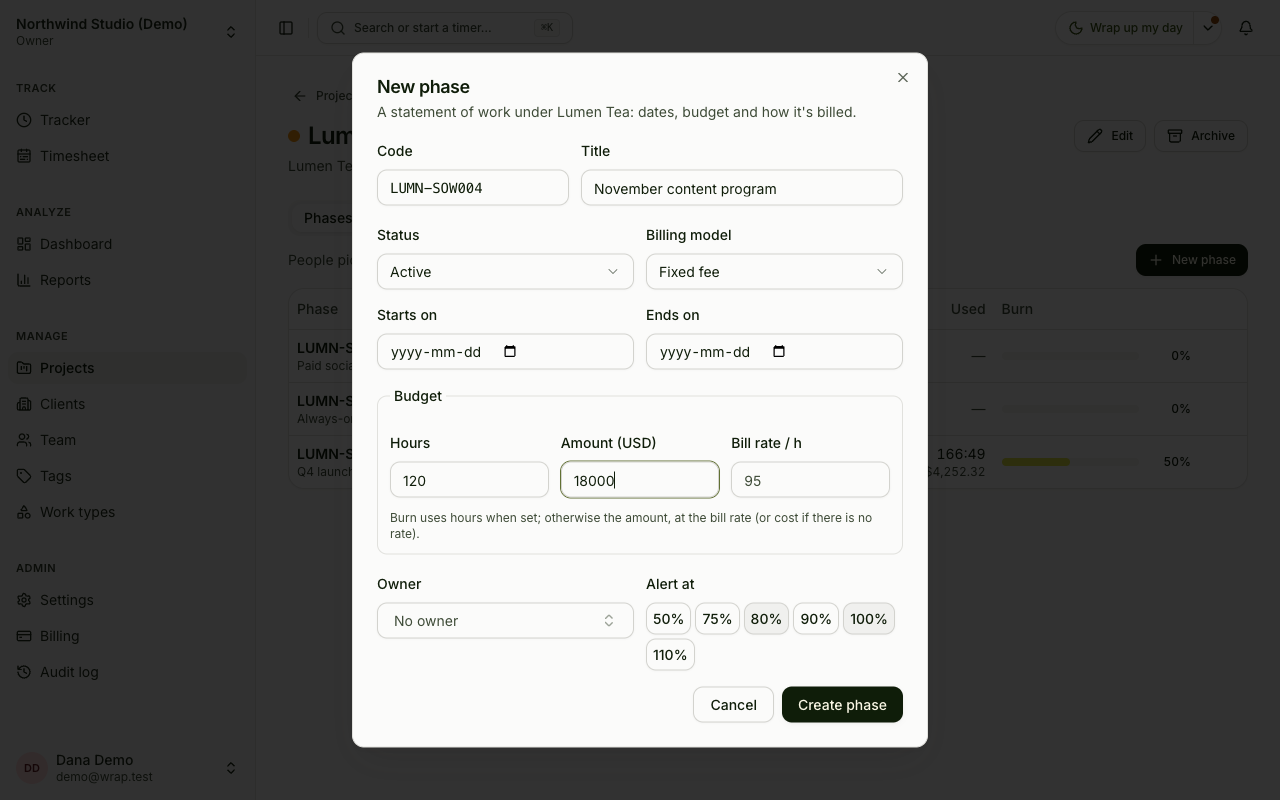
Add a statement-of-work phase with dates, billing model, budget and alert thresholds.
Before you start
- Who can do this
- Owner or Admin to create; phase owners can edit their existing phases
- You need
- An existing client project.
Steps
- 01
Open the client project
Choose Projects and open the engagement. On Phases, click New phase.
- 02
Identify and activate the phase
Review Code, enter Title and choose Status. Use Active when the phase should be available for tracking.
- 03
Choose billing and dates
Select Fixed fee, Time & materials or Monthly retainer. Fill Starts on and Ends on where the engagement has dates.
- 04
Set the budget
Enter Hours and/or Amount in the organization’s currency. Add Bill rate / h if applicable. Monthly retainer budgets are labelled per month.
- 05
Choose ownership and alerts
Select Owner and the Alert at percentages you want. Click Create phase and review the phase in the project’s table.
What you should see
The phase appears with its billing model and budget, ready for tracking when active.
Good to know
- Budget hours must be positive, and the end date cannot precede the start date.
- Burn uses hours when supplied; otherwise it uses the amount at the bill rate, or cost when there is no rate.
- Creating a budget is not an invoice or payment action.
Keep going
Put the answers to work
on tomorrow’s timesheet.
Try Wrap with your own team. Free for up to 10 active members.